
Our checkout process has changed slightly. Here's what to expect and how to make sure your order goes through successfully.
What Happens After You Enter Your Payment Info
Once you submit your credit card information, you'll land on a Receipt page. This page shows a summary of your shipping address and payment information so you can review everything before it's finalized.
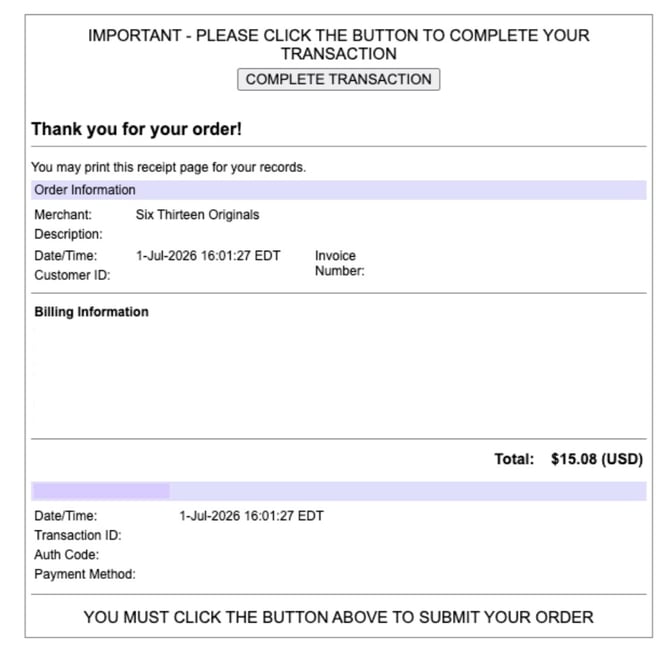
The Most Important Step: Click "COMPLETE TRANSACTION"
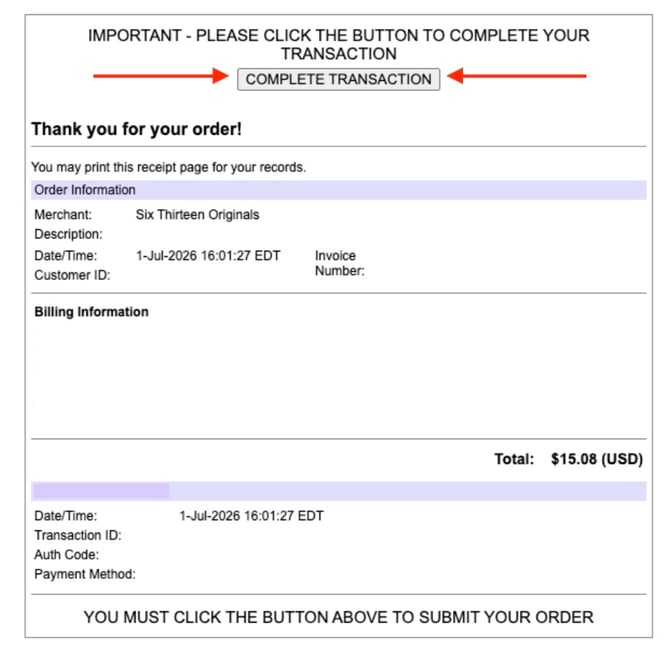
At the top of the Receipt page, you'll see a button labeled COMPLETE TRANSACTION.
⚠️ This step is required. You must click COMPLETE TRANSACTION to actually place your order. If this button is not clicked, your order will not go through properly.
Quick Checklist:
- Enter your credit card information.
- Land on the Receipt page and review your order summary.
- Click COMPLETE TRANSACTION at the top of the page.
- Look for your order confirmation.
Didn't Click the Button?
If you left the Receipt page without clicking COMPLETE TRANSACTION, your order was not submitted - please reach out to our support team to confirm your order.
If you have any questions, you can reach out to our support team and they can help you! You can reach out over chat at 613originals.com, call us at 866-613-6744, or email us at support@613originals.com